Order History Analyzer
Upload your order ZIP codes and see your shipping zone mix, delivery speed and estimated cost per order from Atomix warehouses in Milwaukee, Baltimore and Salt Lake City.
Export ship-to ZIP codes from your store
You only need one column: the ship-to ZIP code for each order. Here is where to find it on the three most common platforms.

Shopify
In Shopify admin, go to Orders.
Filter to the last 3 to 12 months.
Click Export and choose CSV for Excel.
Upload the file. We read the Shipping Zip column.

WooCommerce
Use an order export extension for WooCommerce.
Choose a date range of 3 to 12 months.
Include the Shipping Postcode field.
Download the CSV and upload it here.

Amazon Seller Central
Go to Reports and open order reports.
Request a report for the last 3 to 12 months.
Download it once it is ready.
Upload it. We read the ship-postal-code column.
See where your orders ship and what it costs
Add your ship-to ZIP codes, pick a service level and compare your zone mix from Atomix warehouses with where you ship from today.
Have Atomix run a full order analysis with real rates
Send us your order file and we will model your costs from Milwaukee, Baltimore and Salt Lake City with Atomix rates, then walk you through the results on a call.
Shipping zones and why your average zone matters
What is a shipping zone?
A shipping zone is a measure of distance between where a package ships from and where it is delivered. UPS, FedEx and USPS group US destinations into Zones 1 through 8 based on the first three digits of the origin and destination ZIP codes. Zone 1 is closest and Zone 8 is farthest.
Why your average zone drives shipping cost
Carriers price ground parcels by weight and zone, so each extra zone adds cost and transit time to every order. A lower average zone across your order history means lower shipping spend and faster delivery, which is why where you ship from matters as much as the rates you pay.
How the analyzer works
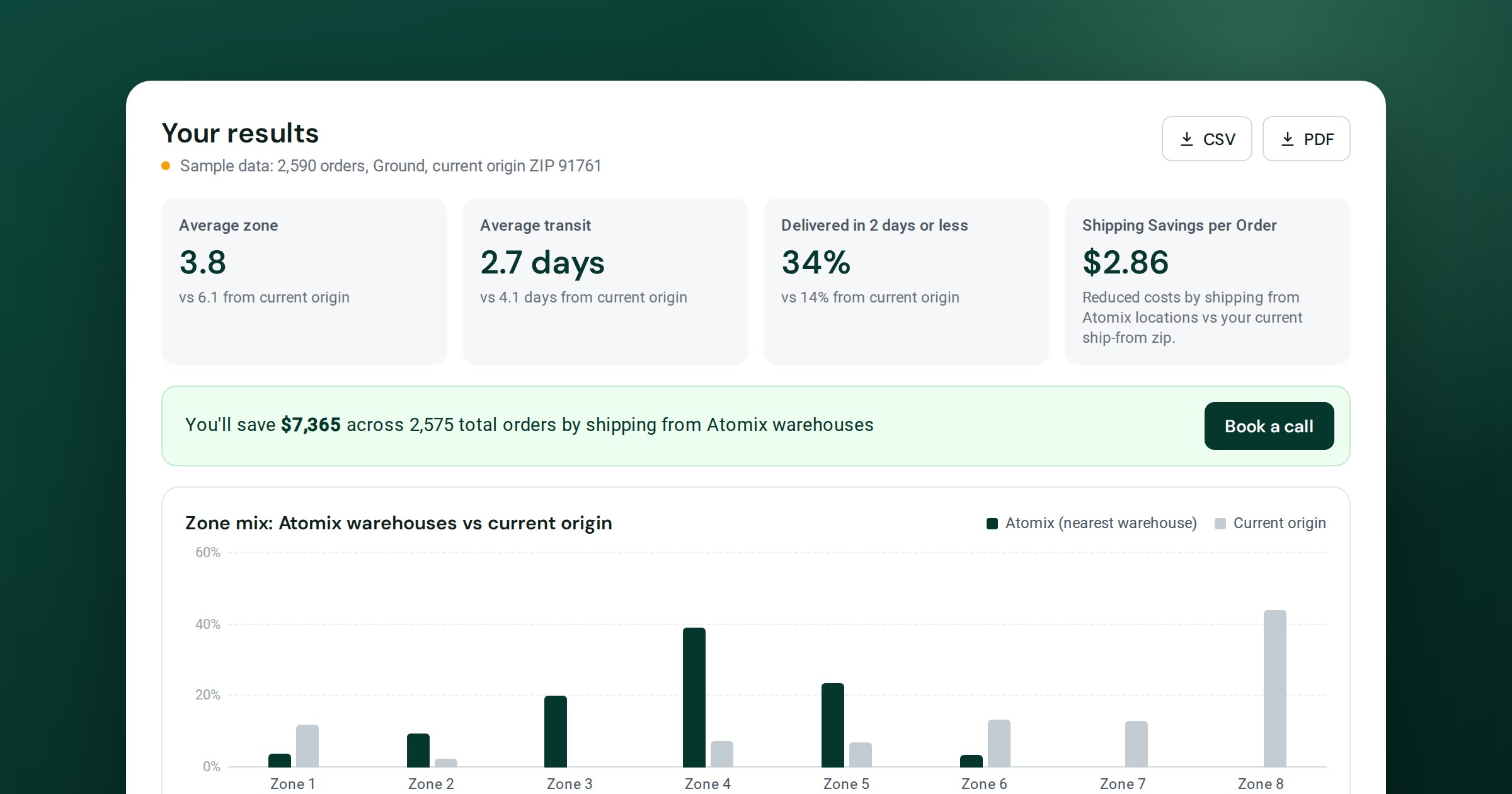
For each ZIP code in your file, the analyzer estimates the zone and typical transit days from the nearest Atomix warehouse you select, and from your current origin if you add one, based on the distance between ZIP code areas. It then prices each order at Atomix Ground or Economy rates using the order's weight, or your average package weight, and compares the average with the shipping cost per order you pay today.
Worked example
The analyzer's sample data is a brand shipping about 2,600 Ground orders a month from Ontario, California, with most customers east of the Rockies and an average package weight of 2 lb.
Sample figures for illustration, at Atomix Ground rates before surcharges. Your results depend on your own order mix and weights.
Order History Analyzer FAQs
Is my order file uploaded anywhere?
No. The file is read in your browser and never sent to a server. The analyzer only reads the ZIP column, plus order count and weight if you include them, and ignores names and addresses.
What file format do I need?
A CSV with one row per order and a ship-to ZIP code column. Shopify and Amazon order exports work as they are. For WooCommerce, use an order export that includes the shipping postcode. If you open the file in Excel, save it as a CSV before uploading. You can also paste a list of ZIP codes.
How accurate are the results?
Zones are estimated from the distance between ZIP code areas and transit days are typical times for each zone. Atomix costs use Atomix Ground and Economy rates before carrier surcharges such as fuel and residential fees, and savings compare them with the average shipping cost you enter. Treat the results as a planning estimate.
Which warehouses does it compare?
Each order is matched to the nearest Atomix warehouse you select: Milwaukee, Baltimore, Salt Lake City or any combination of them. If you add the ZIP code you ship from today, zones and delivery times are compared side by side.
How many orders can I analyze?
Up to 50,000 rows at a time. For larger files, book a call and our team will run the full analysis for you.
What does the full analysis with Atomix include?
Our team runs your complete order file against Atomix rates and all three warehouses, then walks you through cost, zone and delivery-speed changes on a call.
See your real shipping numbers
Book a call and we will run your full order history against Atomix rates and warehouses, so you can see the cost and delivery-speed change before you decide anything.
Book a call